See The Cut Before The First Snip
END THE "NOT WHAT I ASKED FOR" CUT
ChairSlot's AI hairstyle preview lets a client upload a photo and see a chosen style rendered on their own face before you ever pick up the clippers. Powered by a top-tier image model, it turns a vague "something like this" into a clear, agreed-on look — so you cut with confidence and they leave thrilled.
"Just A Little Off The Top" Means Six Different Things
Words Don't Cut Hair
A client describes one thing and pictures another. By the time the difference shows up in the mirror, it's too late to take hair back.
The Reference Photo Is Someone Else
They hold up a photo of a model with totally different hair and face shape. You both know it won't translate, but there's no way to show that up front.
The Awkward Reveal
When the cut doesn't match what they imagined, you eat the redo, the bad review, and a client who won't be back — through no real fault of yours.
The Preview That Sells The Cut
On Their Own Face
Clients upload a photo and see the style rendered on themselves — not a stock model. It's the difference between imagining a cut and actually seeing it.
Powered By A Top Image Model
The preview runs on a leading AI image model tuned for realistic, high-resolution results that keep the client's natural hair color and features intact.
Cut The Guesswork
Barber and client agree on the exact look before the chair, so you cut with a clear target and dramatically fewer "that's not what I meant" surprises.
Sell The Upgrade
When a client can see a bolder style on their own face, the upsell sells itself — a fade, a design, a fuller change feels safe because they've already seen it.
Saved Style History
Every previewed look is saved to the client's photo history and style gallery, so next visit picks up right where the last cut left off.
The Feature Clients Talk About
An AI haircut preview is the kind of experience clients screenshot and share. It's a reason to choose your shop over the one that just hands them a mirror.
Guesswork Out, Confidence In
- 1
Snap & Upload
At the kiosk or on a phone, the client takes or uploads a photo of themselves — that's all the AI needs to work from.
- 2
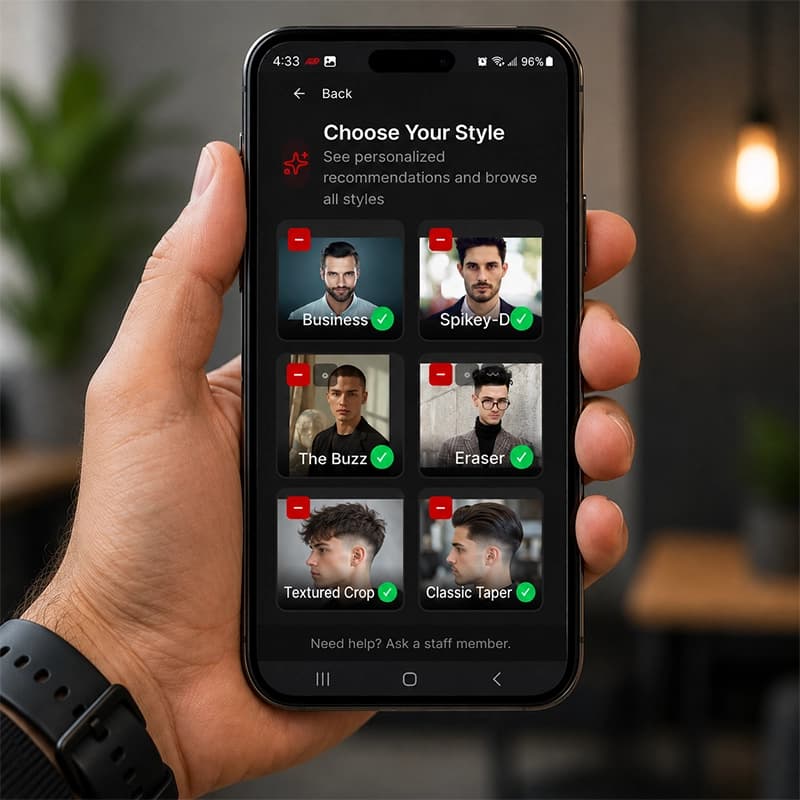
Pick A Style, See It Rendered
They choose a style and the AI renders it on their own face in high resolution, keeping their natural hair color, so the preview looks like them.
- 3
Agree, Then Cut
Barber and client look at the same agreed-on result, save it to the client's style history, and you cut to a target you both already approved.
What AI Preview Does For The Shop
Fewer redos and refunds from cuts that didn't match expectations
A built-in upsell — clients buy the bolder style once they can see it
A standout experience that gets clients talking and coming back
Every previewed look saved to the client's style history for next time
Better For Everyone In The Shop
Frequently Asked Questions
What is an AI hairstyle preview?
An AI hairstyle preview lets a client upload a photo of themselves and see a chosen haircut or style rendered on their own face before the cut. ChairSlot's preview is powered by a top-tier AI image model, produces high-resolution results, and keeps the client's natural hair color — so it looks like them, not a stock model.
How realistic is the AI haircut preview?
ChairSlot runs the preview on a leading image model tuned for photorealistic, high-resolution output. It renders the chosen style on the client's actual photo while preserving their natural hair color and features, so the result is a believable look at the cut rather than a generic mock-up.
How do clients use the AI preview in the shop?
Clients can use it at the check-in kiosk or from a phone: they upload a photo, pick a style, and the AI renders it on their face. The previewed look is saved to their photo history and style gallery, so the barber knows exactly what was agreed on and the next visit can build on it.
Does the AI preview use photos, and which plans include them?
Yes. Each AI preview uses one AI preview photo, which are included monthly on the Starter (40), Pro (100), and Business (300) plans. The one-time $1,399 Lifetime license includes the feature but buys AI preview photos separately. The AI hairstyle preview itself is available on every plan.
Does the AI preview help reduce mismatched-expectation cuts?
That's the point of it. When the barber and client both look at the same rendered preview on the client's own face and agree before the chair, you cut to a clear, approved target — which means far fewer "that's not what I asked for" moments, redos, and refunds.
One System, Every Feature
Let Clients See It Before You Cut It
Turn "something like this" into an agreed-on look on the client's own face. Add AI hairstyle preview to your shop today — every feature is on every plan, month-to-month, cancel anytime.